Blogia
Las Pequeñas Paranoyas de Motagirl

Tech/Geek/Craft

El tamaño de los CDs sí importa


"El diámetro de los discos compactos, que es de 5" (12,7 cm), corresponde a la anchura de los bolsillos superiores de las camisas para hombres, porque según la filosofía de Sony, todo debía caber allí."


Y no lo digo yo, lo dice la wikipedia.


¿Qué OS/file-extension eres?


Miau!

Otra ronda de tests ^^


Encontré estos dos en el blog de Kurisu Neko, espero que os gusten =^_^=


Which File Extension are You?

You are .mpg You live life like it was a movie.  Constantly in motion, you bring pleasure to many, but are often hidden away.

Eres un .mpg! Vives la vida como si fuera una película. Siempre en movimiento, haces disfrutar a la gente, pero a menudo estás oculto.


Which OS Are You?

Eres Windows XP!! Debajo de tu exterior alegre y luminoso hay una personalidad fuerte y firme. Tienes tendencia a hacer más de lo que se te ha pedido, o incluso de lo que quieres.


Qué maja :3 Aunque eso no quita que sea un windous (Había una pregunta buenísima, que decía: "Te importa lo que salga de este test?" y una de las respuestas era "No, pero como me salga Windows ME alguien va a salir herido..." xDDD)


Detector óptico de barrera (DIY)


Otra divertida y apasionante práctica de Automatización!! Cómo me gusta esta asignatura :3


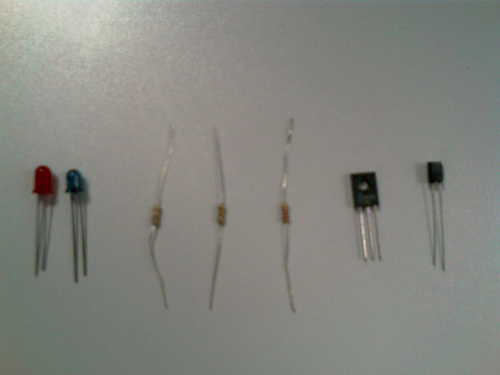
Esta vez, el circuito que construimos ha sido un Detector Óptico de Barrera por menos de 3 eurillos usando estos componentes (aunque a nosotros nos invita la uni): Diodo LED normal y corriente, Diodo LED infrarrojo (IRED), resistencia de 220 ohmios, dos resistencias de 1000 KOhmios, transistor (no sé exáctamente de qué tipo) y fototransistor

Componentes

¿En qué consiste un detector de este tipo? Pues muy facil. Simplemente son dos circuitos separados (el del emisor y el del receptor), que trabajan conjuntamente para detectar cuándo se interpone un objeto opaco entre ellos.

 - Circuito del Emisor:

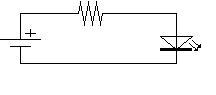
Más simple que el mecanismo de un botijo.  Consta simplemente de una fuente de alimentación (6 Voltios), una resistencia (220 ohmios en nuestro caso) y un diodo LED emisor de infrarrojos (o sea, un IRED).

Circuito Emisor (esquema)

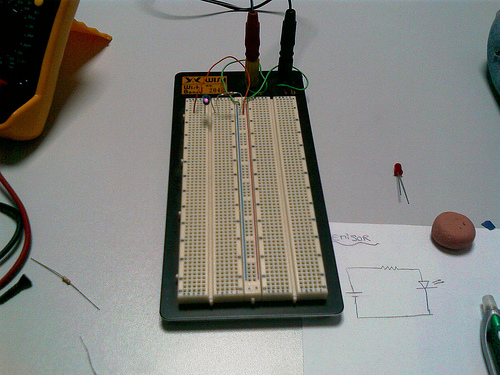
Esto lo que hace es emitir luz infrarroja constantemente.  La luz infrarroja no puede verse a simple vista, pero, TRUCO: usando una cámara de un teléfono móvil, sí que puede verse :O   (se aprecia en la siguiente imagen)


Placa de pruebas I


- Circuito del Receptor:

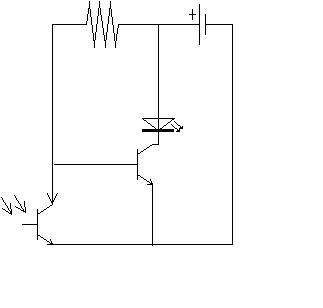
 También bastante sencillo. Usaremos  la misma fuente de alimentación de 6 Voltios. El elemento que actuará como detector será un fototransistor . Este elemento conduce corriente cuando su base es excitada por luz infrarroja (la del emisor). Estos son un poco cerdos porque solo tienen 2 patitas y parecen diodos.  Lo que se consigue con esto es que la corriente encuentre menos resistencia por ese camino y "pase" por alli. Sin embargo,cuando se interpone un objeto entre el emisor infrarrojo y el fototransistor, éste deja de se conductor y  los electrones pasan por el lado en el que encuentran menos resistencia: el del diodo LED normal, que se enciende (además tenemos otro transistor enmedio actuando como una especie de interruptor).

Circuito Receptor (esquema)

Y bueno, poco más que decir sobre esto.

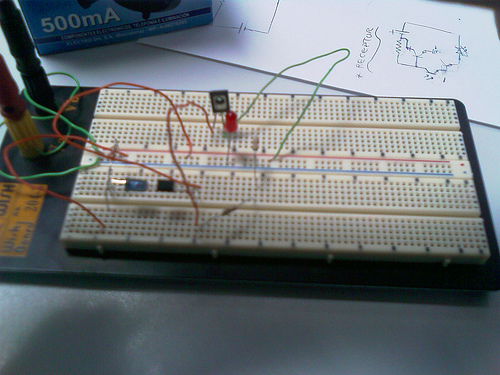
Os enseño una imagen del circuito una vez terminado:


Placa de pruebas II


Y como novedad, un video casero del funcionamiento del invento. Aunque la distancia entre emisor y receptor en nuestro caso es un centímetro aproximadamente, el profesor nos ha comentado que con esta mierdecilla de componentes podríamos consguir hasta 15 o asi :)


Porcierto,volvimos a olvidarnos las tijeras en casa. Menos mal que tuvimos que usar pocos cables y estaban todos pelados ya XD

Circuito de detección de presencia de tren en vía (DIY)


- "¿Qué has hecho hoy en el cole?"

- "err... quemar diodos xD"


Circuito


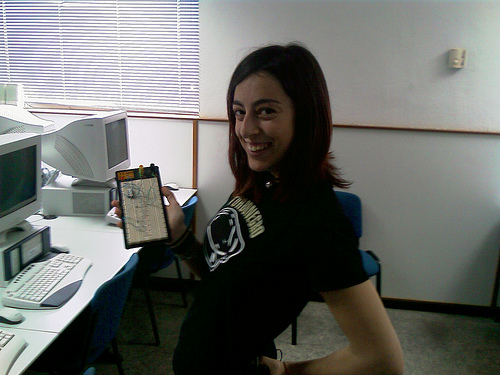
Salgo horrible de cara, pero feliz de corazon (excusa barata)

Ese es nuestro circuito majete, justo antes de probarlo... y quemar los diodos y el optoacoplador (y probablemente tambien el LED) xD En fin, una pura fiesta.

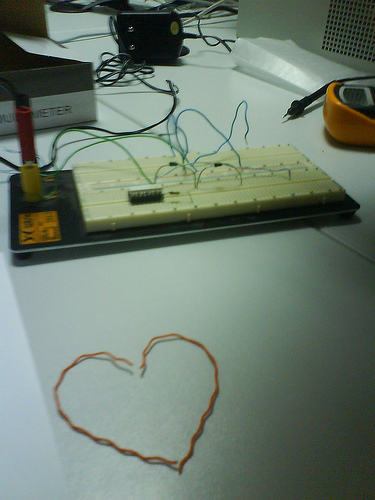
Se puede ver (a falta de otro diodo más y un LED) junto con "el resultado de la alineacion aleatoria y casual de dos fragmentos de cable arbitrariamente retorcidos" (by skelv)

Circuito con Amor

Bonito, verdad? No se ve muy claro, pero basicamente es esto:

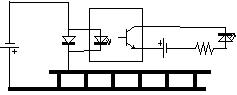
Esquema circuito

Una via de tren, por la que pasará un tren que hará de resistencia, cerrando el circuito de la izquierda. Cuando se cierra el circuito de la izquierda se produce una caída de tensión en el diodo, que alimenta al diodo LED encapsulado dentro del optoacoplador. Éste excita la base del transistor (también encapsulado), cerrando el circuito de la derecha y provocando que se encienda el LED que señalizará el paso del tren.

La gracia está en que no importa el voltaje al que se conecte (siempre que haya una resistencia -el tren- que impida que se quemen los diodos): los diodos siempre van a darnos una caída de tensión constante (concretamente, los que usamos eran de 1.07 voltios) que impedirá que quememos el optoacoplador (el nuestro, CNY74-4H ) tenía una tensión máxima de 1.6 Voltios). Para alimentar la via usamos un generador de 9Voltios. 

Divertido, verdad?
Yo lo pasé chachi, aunque la cagáramos con las polaridades xD

No se me ocurre nada más que explicar sobre ello, asique dudas, patatas y elefantes voladores, en los comentarios :)

Nota Mental para Skelv, Podereski y yo misma: Coger unas tijeras, pelar los cables con los dientes no es muy bueno xD

PS: El hecho de que me sepa los códigos de colores de las resistencias, hace que me miren mal u_u

Lenguaje Amoroso de un Chico Geek


juars juars juars

acabo de ver esto en TecnoDiva y me estoy partiendo la caja un buen rato xD 

 (En negrita, lo que dijo el geek. En cursiva, lo que quiso realmente decir)


            "Tengo tu fotografía guardada en la carpeta de mis imágenes”
            A lo que quiere decir:
            “Tu recuerdo me inunda cada vez que cierro los ojos”


“Te voy a montar un directorio activo, con servicios dns y dhcp”
A lo que quiere decir:
“¿ Quieres irte a vivir conmigo, tener una casa , perro y gato?”


“Voy a tener que limpiarte el slot del puerto agp”
A lo que quiere decir:
” ¿Quieres sexo?”


“Mi servidor de impresión tiene una cola muy larga”
A lo que quiere decir:
“No lo escribo por que es un poco grosero, pero si no lo sabes tienes un
problema”


“La mejor solución va a ser virtualizar tus servidores”
A lo que quiere decir:
” Creo que nuestra relación va mas allá del sentimiento metafísico humano”


“Pedazo de servidor con doble procesador que tienes”
A lo que quiere decir:
” ¡Vaya par de tetas!”


“He implementado un sistema de backup de imágenes en el servidor”
A lo que quiere decir:
“Cuando estoy a tu lado, me siento más seguro.”


“Desde que instalé el service pack todo va mejor”
A lo que quiere decir:
“Cuando tuvimos sexo nuestra relación mejoró”


“En mi escenario tengo sistemas Microsoft y sistemas Linux cada uno
con su servicio”

A lo que quiere decir:
” Nos respetamos, confiamos en nosotros mismos, y quiero tener una familia
contigo”


“Tengo un Mac”
A lo que quiere decir:
“Lo nuestro fue amor a primera vista”


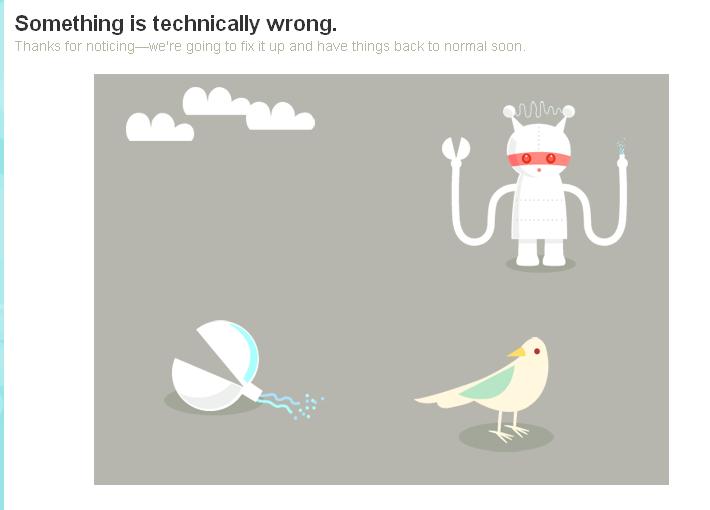
Adorable imagen de error en twitter


Es monísima!! Casi me entran ganas de que falle (aún)  más a menudo....


Something is technically wrong


No se si existiría antes, pero yo hoy es la primera vez que la veo :3 

Understanding Art for Geeks


(Visto en ALT1040


Impresionante la cantidad de fricazos de level maximo que hay por ahi :3 Como muestra, PaulTheWineGuy , que se dedica a "geekizar" obras de arte clásicas. Yo hago una selección con las que más me han gustado, pero el set completo de flickr podeis encontrarlo aqui ^^ 


The Scream. (Edvard Munch, 1893)


Composition with Yellow, Blue, and Red (Piet Mondrian, 1921)


100 Cans (Andy Warhol, 1962)


 One blue pussy (Andy Warhol, 1954)


Annunciation (Antonello da Messina, 1474-1475)


 The Creation of Adam (Michelangelo, 1477-80)


 L’Absinthe (Edgar Degas, 1876)


 The inspiration of St. Matthew (Caravaggio, 1602)


David with the Head of Goliath (Caravaggio, 1609-10)


 The Thinker (Auguste Rodin, 1609-10)


 The Last Supper (Leonardo da Vinci, 1495–1498)


 Galileo facing the Roman Inquisition (Cristiano Banti, 1857)


 Signboard for a Schoolmaster (Ambrosius Holbein, 1516)


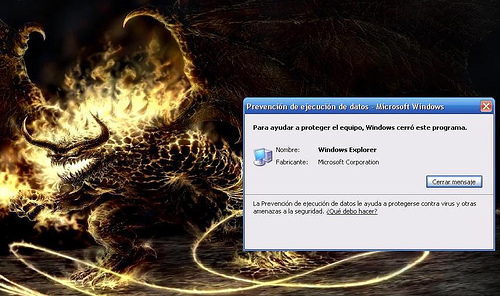
Windows Explorer, una amenaza a la seguridad


Pensaba que esta advertencia, en la que Windows se detecta a sí mismo como virus era una leyenda urbana pero.... no! Ayer estaba en casa de pablo y me dijo "Ven, que me acaba de salir un error más raro.... " ... y voy y me encuentro esto xD

 (clic para ampliar)


Windows Error


Prevención de ejecución de datos - Microsoft Windows

Para ayudar a proteger el equipo, Windows cerró este programa.

Nombre: Windows Explorer

Fabricante: Microsoft Corporation


Ains...

Ubuntu 7.10 (breve)

He actualizado por fin a Ubuntu 6.10 7.04 7.10 !! Si, habeis leido bien, 6.10 7.04 7.10 xD


Hasta ahora usaba la 6.06 (con un par) pero ya empezaba a no haber soporte para ciertas cosicas y era un poco cansino... asíque en una tarde muerta me han convencío :3

Ya no soy Dapper, ahora soy una Edgy Feisty Fawn Gutsy Gibbon feliz juas juas (estoy delirando, lo se) Y misteriosamente no he tenido ningún problema ... ya saldŕan Estaban esperando a que mirara para otro lado, lo se. Ahora, mágicamente muestra la partición donde tengo todos los documentos y tal, excepto la carpeta de música e imágenes, que... oh casualidad, son las que más utilizo ¬¬  No pienso arreglarlo ahora, que estamos de exámenes, leite


Mañana, la semana que viene seguiremos upgradeando.... o no xD Creo que por ahora ya está bien .. hasta abril


PS: SÍ, es un auto-auto-copy-paste xD

Ubuntu 7.04 (breve)


He actualizado por fin a Ubuntu 6.10 7.04!! Si, habeis leido bien, 6.10 7.04 xD


Hasta ahora usaba la 6.06 (con un par) pero ya empezaba a no haber soporte para ciertas cosicas y era un poco cansino... asíque en una tarde muerta me han convencío :3

Ya no soy Dapper, ahora soy una Edgy Feisty Fawn feliz juas juas (estoy delirando, lo se) Y misteriosamente no he tenido ningún problema ... ya saldŕan xD


Mañana, la semana que viene seguiremos upgradeando.... o no xD


PS: SÍ, es un auto-copy-paste xD 

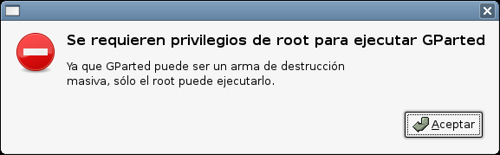
Gparted party


Tachán!!

Mágica captura de pantalla de cuando intentas ejecutar gparted sin ser superuser xD


(he intentado hacer una del "modo fiesta" (literal) del  Rhythmbox pero no ha sido posible, tendreis que creerlo ^^)


Y ahora os dejo , que guille (sí, GUILLE xD) me obliga a seguir trabajando u_u 

Ubuntu 6.10 (breve)


He actualizado por fin a Ubuntu 6.10!! Si, habeis leido bien,  6.10 xD 


Hasta ahora usaba la 6.06 (con un par) pero ya empezaba a no haber soporte para ciertas cosicas y era un poco cansino... asíque en una tarde muerta me han convencío :3

Ya no soy Dapper, ahora soy una Edgy feliz juas juas (estoy delirando, lo se) Y misteriosamente no he tenido ningún problema ... ya saldŕan xD 


Mañana, seguiremos upgradeando.... o no xD


Chef: simpatico lenguaje de programación

Ayer, o antes de ayer, o por ahi mas o menos, leí en emezeta este artículo sobre lenguaje de programación complicados o... mas bien raros (oficialmente, "lenguajes esotéricos"). Y de entre todos ellos , a pesar de que los habia muy bonitos (como el brainfuck (que sólo usa punteros), whitespace (que solo usa espacios, tabuladores y retornos de carro) o el ook (que solo usa las palabras "ook.", "ook?" y "ook!").... me quedo sin dudarlo con el Chef. Aquí os dejo su helloworld :


Hello World Souffle:


Ingredients.
72 g haricot beans
101 eggs
108 g lard
111 cups oil
32 zucchinis
119 ml water
114 g red salmon
100 g dijon mustard
33 potatoes

Method.
Put potatoes into the mixing bowl. Put dijon mustard into the mixing bowl. Put lard into the mixing bowl. Put red salmon into the mixing bowl. Put oil into the mixing bowl. Put water into the mixing bowl. Put zucchinis into the mixing bowl. Put oil into the mixing bowl. Put lard into the mixing bowl. Put lard into the mixing bowl. Put eggs into the mixing bowl. Put haricot beans into the mixing bowl. Liquefy contents of the mixing bowl. Pour contents of the mixing bowl into the baking dish.

Serves 1.

(cuanto menos, peculiar XD)

El número de ingredientes (72, 101, etc) no es nada más y nada menos que la codificación binaria de las letras de Hello World , y el " put in the mixing bowl" lo echa por salida.


Y ahora... un ejemplo más pro: mostrar por pantalla los primeros 100 fibonacci :


Fibonacci Numbers with Caramel Sauce.


Ingredients.
100 g flour
250 g butter
1 egg

Method.
Sift the flour. Put flour into mixing bowl. Serve with caramel sauce. Stir for 2 minutes. Remove egg. Rub the flour until sifted. Stir for 2 minutes. Fold the butter into the mixing bowl. Pour contents of the mixing bowl into the baking dish.

Serves 1.

Caramel Sauce.

Ingredients.
1 cup white sugar
1 cup brown sugar
1 vanilla bean

Method.
Fold white sugar into mixing bowl. Put white sugar into mixing bowl. Fold brown sugar into mixing bowl. Clean mixing bowl. Put white sugar into mixing bowl. Remove vanilla bean. Fold white sugar into mixing bowl. Melt white sugar. Put vanilla bean into mixing bowl. Refrigerate. Heat white sugar until melted. Put white sugar into mixing bowl. Remove vanilla bean. Fold white sugar into mixing bowl. Caramelise white sugar. Put vanilla bean into mixing bowl. Refrigerate. Cook white sugar until caramelised. Put white sugar into mixing bowl. Serve with caramel sauce. Fold brown sugar into mixing bowl. Put white sugar into mixing bowl. Add vanilla bean. Serve with caramel sauce. Add brown sugar.


(el caramel sauce es un método auxiliar)


BONUS:

*Principios de diseño:

- Las recetas no solamente deben generar salidas válidas: deben ser fáciles de preparar y deliciosas.

- Las recetas deben ser aptas para todos los presupuestos.

- Se usará el sistema métrico, aunque pueden usarse medidas traidiconales como "tazas" o "cucharillas"


BONUS 2: ( en inglés, que estoy perra)

Language Concepts

Ingredients

All recipes have ingredients! The ingredients hold individual data values. All ingredients are numerical, though they can be interpreted as Unicode for I/O purposes. Liquid ingredients will be output as Unicode characters, while dry or unspecified ingredients will be output as numbers.

Mixing Bowls and Baking Dishes

Chef has access to an unlimited supply of mixing bowls and baking dishes. These can contain ingredient values. The ingredients in a mixing bowl or baking dish are ordered, like a stack of pancakes. New ingredients are placed on top, and if values are removed they are removed from the top. Note that if the value of an ingredient changes, the value in the mixing bowl or baking dish does not. The values in the mixing bowls and baking dishes also retain their dry or liquid designations.

Multiple mixing bowls and baking dishes are referred to by an ordinal identifier - "the 2nd mixing bowl". If no identifier is used, the recipe only has one of the relevant utensil. Ordinal identifiers must be digits followed by "st", "nd", "rd" or "th", not words.

Syntax Elements

The following items appear in a Chef recipe. Some are optional. Items must appear in the order shown below, with a blank line (two newlines) between each item.

Recipe Title

The recipe title describes in a few words what the program does. For example: "Hello World Souffle", or "Fibonacci Numbers with Caramel Sauce". The recipe title is always the first line of a Chef recipe, and is followed by a full stop.

recipe-title.

Comments

Comments are placed in a free-form paragraph after the recipe title. Comments are optional.

Ingredient List

The next item in a Chef recipe is the ingredient list. This lists the ingredients to be used by the program. The syntax is

Ingredients.
[initial-value] [[measure-type] measure] ingredient-name
[further ingredients]

Ingredients are listed one per line. The intial-value is a number, and is optional. Attempting to use an ingredient without a defined value is a run-time error. The optional measure can be any of the following:

  • g | kg | pinch[es] : These always indicate dry measures.
  • ml | l | dash[es] : These always indicate liquid measures.
  • cup[s] | teaspoon[s] | tablespoon[s] : These indicate measures which may be either dry or liquid.

The optional measure-type may be any of the following:

  • heaped | level : These indicate that the measure is dry.

The ingredient-name may be anything reasonable, and may include space characters. The ingredient list is optional. If present, it declares ingredients with the given initial values and measures.

Cooking Time

Cooking time: time (hour[s] | minute[s]).

The cooking time statement is optional. The time is a number.

Oven Temperature

Pre-heat oven to temperature degrees Celcius [(gas mark mark)].

Some recipes require baking. If so, there will be an oven temperature statement. This is optional. The temperature and mark are numbers.

Method

Method.
method statements

The method contains the actual recipe instructions. These are written in sentences. Line breaks are ignored in the method of a recipe. Valid method instructions are:

  • Take ingredient from refrigerator.
    This reads a numeric value from STDIN into the ingredient named, overwriting any previous value.
  • Put ingredient into [nth] mixing bowl.
    This puts the ingredient into the nth mixing bowl.
  • Fold ingredient into [nth] mixing bowl.
    This removes the top value from the nth mixing bowl and places it in the ingredient.
  • Add ingredient [to [nth] mixing bowl].
    This adds the value of ingredient to the value of the ingredient on top of the nth mixing bowl and stores the result in the nth mixing bowl.
  • Remove ingredient [from [nth] mixing bowl].
    This subtracts the value of ingredient from the value of the ingredient on top of the nth mixing bowl and stores the result in the nth mixing bowl.
  • Combine ingredient [into [nth] mixing bowl].
    This multiplies the value of ingredient by the value of the ingredient on top of the nth mixing bowl and stores the result in the nth mixing bowl.
  • Divide ingredient [into [nth] mixing bowl].
    This divides the value of ingredient into the value of the ingredient on top of the nth mixing bowl and stores the result in the nth mixing bowl.
  • Add dry ingredients [to [nth] mixing bowl].
    This adds the values of all the dry ingredients together and places the result into the nth mixing bowl.
  • Liquefy | Liquify ingredient.
    This turns the ingredient into a liquid, i.e. a Unicode character for output purposes. (Note: The original specification used the word "Liquify", which is a spelling error. "Liquify" is deprecated. Use "Liquefy" in all new code.)
  • Liquefy | Liquify contents of the [nth] mixing bowl.
    This turns all the ingredients in the nth mixing bowl into a liquid, i.e. a Unicode characters for output purposes.
  • Stir [the [nth] mixing bowl] for number minutes.
    This "rolls" the top number ingredients in the nth mixing bowl, such that the top ingredient goes down that number of ingredients and all ingredients above it rise one place. If there are not that many ingredients in the bowl, the top ingredient goes to tbe bottom of the bowl and all the others rise one place.
  • Stir ingredient into the [nth] mixing bowl.
    This rolls the number of ingredients in the nth mixing bowl equal to the value of ingredient, such that the top ingredient goes down that number of ingredients and all ingredients above it rise one place. If there are not that many ingredients in the bowl, the top ingredient goes to tbe bottom of the bowl and all the others rise one place.
  • Mix [the [nth] mixing bowl] well.
    This randomises the order of the ingredients in the nth mixing bowl.
  • Clean [nth] mixing bowl.
    This removes all the ingredients from the nth mixing bowl.
  • Pour contents of the [nth] mixing bowl into the [pth] baking dish.
    This copies all the ingredients from the nth mixing bowl to the pth baking dish, retaining the order and putting them on top of anything already in the baking dish.
  • Verb the ingredient.
    This marks the beginning of a loop. It must appear as a matched pair with the following statement. The loop executes as follows: The value of ingredient is checked. If it is non-zero, the body of the loop executes until it reaches the "until" statement. The value of ingredient is rechecked. If it is non-zero, the loop executes again. If at any check the value of ingredient is zero, the loop exits and execution continues at the statement after the "until". Loops may be nested.
  • Verb [the ingredient] until verbed.
    This marks the end of a loop. It must appear as a matched pair with the above statement. verbed must match the Verb in the matching loop start statement. The Verb in this statement may be arbitrary and is ignored. If the ingredient appears in this statement, its value is decremented by 1 when this statement executes. The ingredient does not have to match the ingredient in the matching loop start statement.
  • Set aside.
    This causes execution of the innermost loop in which it occurs to end immediately and execution to continue at the statement after the "until".
  • Serve with auxiliary-recipe.
    This invokes a sous-chef to immediately prepare the named auxiliary-recipe. The calling chef waits until the sous-chef is finished before continuing. See the section on auxiliary recipes below.
  • Refrigerate [for number hours].
    This causes execution of the recipe in which it appears to end immediately. If in an auxiliary recipe, the auxiliary recipe ends and the sous-chef's first mixing bowl is passed back to the calling chef as normal. If a number of hours is specified, the recipe will print out its first number baking dishes (see the Serves statement below) before ending.

Serves

The final statement in a Chef recipe is a statement of how many people it serves.

Serves number-of-diners.

This statement writes to STDOUT the contents of the first number-of-diners baking dishes. It begins with the 1st baking dish, removing values from the top one by one and printing them until the dish is empty, then progresses to the next dish, until all the dishes have been printed. The serves statement is optional, but is required if the recipe is to output anything!

Auxiliary Recipes

These are small recipes which are needed to produce specialised ingredients for the main recipe (such as sauces). They are listed after the main recipe. Auxiliary recipes are made by sous-chefs, so they have their own set of mixing bowls and baking dishes which the head Chef never sees, but take copies of all the mixing bowls and baking dishes currently in use by the calling chef when they are called upon. When the auxiliary recipe is finished, the ingredients in its first mixing bowl are placed in the same order into the calling chef's first mixing bowl.

For example, the main recipe calls for a sauce at some point. The sauce recipe is begun by the sous-chef with an exact copy of all the calling chef's mixing bowls and baking dishes. Changes to these bowls and dishes do not affect the calling chef's bowls and dishes. When the sous-chef is finished, he passes his first mixing bowl back to the calling chef, who empties it into his first mixing bowl.

An auxiliary recipe may have all the same items as a main recipe.


(más en wikipedia )


Las tres hijas del físico


Este es un problema que le han propuesto a mi hermano en el instituto. En mi casa se han rallado tanto que me han llamado por teléfono y todo a ver si a mí se me ocurría cómo resolverlo (no tenía ni idea ^^U)
Finalmente, me han llamado para decirme que durante la cena lo han resuelto los 3 juntitos.
Os lo lanzo, a ver qué os parece (quizá alguno ya lo conozca). La solución, en los comentarios  (no mireis antes de probar!!)


Un físico (A) se encuentra con otro físico (B) y le pregunta por la edad de sus 3 hijas. El físico le responde así:
"El producto de las edades de mis 3 hijas es 36, y la suma es el número de tu casa"
El físico A se va pensando en el problema.
Al día siguiente, se vuelven a encontrar, y A le dice a B:
"Con las pistas que me diste ayer no puedo encontrar las edades de tus hijas!",
a lo que B le respondió:
"Cierto. Pero te diré que la mayor toca el piano"


aleh, a ver quien me dice las 3 edades :)

Carro de Turing

Otra de videos: Máquinas de Turing explicadas por Carlos/Buckethead, dos minutos antes de hacer el examen de Computabilidad/Modelos Abstractos de Cálculo .


 Transcripción porque se oye un poco mal:

(vid1) Alvaro: A ver, qué es lo que es? .. Esto qué es lo que es?

         Carlos: Pues esto basicamente es una representación un tanto friki de una Máquina de Turing, ves? Aquí está la cinta, los unos, los ceros, los blancos...

(vid2) Carlos: Esto es un malvado orco que está esclavizando a los goblins.. y esto en sí es el cabezal que va tirando los ceros, los unos, los blancos.... 


(Porcierto, el otro Turing se ha cubierto de una simpática capa negra de moho que da muy mal rollo. Temo que un día salte de la estantería, me quite un ojo y trate de conquistar el mundo)


Mi PC (y nota para lectores por feed)


Para los que me leen por feed: No os asusteis si veis que salen artículos prehistoricos repetidos mil veces, he creado una categoría nueva y para acomodar los posts he tenido que republicar algunos. Y además, al toquetear la plantilla para meter las nuevas listas de Lastfm y la cosa de Technorati (todo en el lateral izquierdo).. pues también se le ha ido la olla ^^U


Y ahora una bonita imagen, la tipica que se abre en algunas paginas para comerse al navegador y decirte "tienes muchos virus, uhhh vas a morir! haz clic aqui":

(clic para ampliar)


Jooooder, pero si es miPC!! es super creíble... salvo que ni esa es mi IP, ni estoy en Kiev, ni esa es mi version de Firefox, ni tengo dos lectores de disco..... ah! y que uso Ubuntu ¬¬U

(Porcierto, cómo ha avanzado la IA, que ya te permiten "Borrar Archivos Compremetedores"!! Se las saben todas xD)


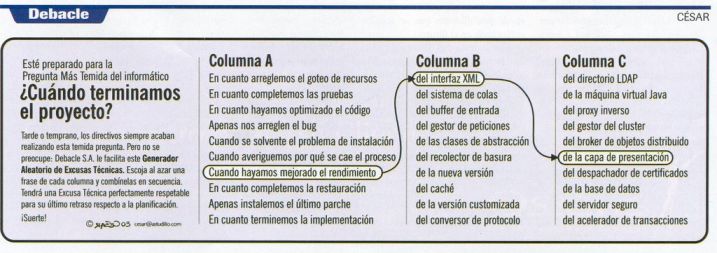
Generador de excusas técnicas


visto en Piratizarros  (posteado por el señor Zeta) 


(disponible modo automático, para vagos, aqui

DIY: Construye tu propio sable laser...

....con sólo una linterna y una grabadora de CD DVD!!


me parece un poco... hmmm como decirlo.... peli.... peli...peligroso!! sí, peligroso es la palabra.


(visto en no puedo creer que lo hayan inventado)


mi gozo a un pozo

Después de haberme pegado la paliza de buscar mi viejo PC, bajarlo del altillo, traerlo a mi estudio y encontrar enchufes y cables como para hacerlo funcionar.... intento cargar solaris y me encuentro con la siguiente fiesta  (aka error de grub):


ERROR 28: SELECTED ITEM CANNOT FIT INTO MEMORY


bieeeeen mota bieeeeen


al parecer, el susodicho pc tiene 128 de RAM  (que además son los que detecta el Grub) , y no ha habido manera de encontrar los requisitos minimos, aunque según esto necesito más bien algunos megas mas...

ahora a decidir: compensa comprarme un modulo más, de segunda mano??? chan chan chan.


Necesito mi kit de destornilladores, rapido!!!


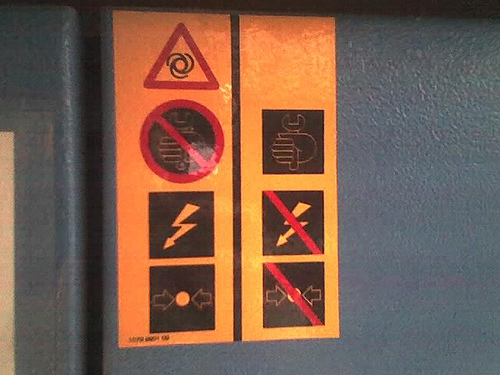
El contradictorio mundo de los compresores

- Viento 

- Mano con herramienta / No mano con herramienta

-  Rayo / No rayo

- Flechas apuntando a circulo / No flechas apuntando a circulo